This is a resource for someone wanting to learn how to code (with the help of AI) from scratch. It has three parts, which you are invited to jump between in any order.
-
To understand code, you need to understand a little about how computers and the internet work. This extra material is not usually included in coding classes, but it’s the wax-on-wax-off portion that will make you the Karate Kid.
-
You need to learn a specific language, in this case python. After all, you’ll need to look at the code the agent writes for you to some degree, and there’s no getting around that. So you still need to “learn to code” the old-fashioned way, as far as we can tell. The goal is not just learning python, but understanding the abstract notional machine that python targets. It’s a model of how computer programs execute, and it carries over to other programming languages.
-
You need to know what to ask the agent for. Therefore you need to know what kinds of software there are, such as web sites and apps. You need to look closely at the ones you use every day and see what screens they have, and how they organize navigation and information. You need to know when you need a database. You need to know about security and privacy. You need to know about testing (QA, quality assurance). You need to know about app stores.
Then you’ll be an expert!
Table of Contents
The Computer
Addition circuits
Computers add numbers together by putting two simple electrical circuits together. It’s a trick, to cause hardware to do something we can call “adding numbers.” I hope this can demystify a lot.
Additional resources about this idea
- NandGame: a game where you build from a NAND gate up through a half adder, full adder, even a CPU.
- Logic Gate Simulator: drag-and-drop AND/OR/XOR with truth tables.
- Crash Course Computer Science #3 Boolean Logic & Logic Gates, #5 How Computers Calculate: the ALU (builds an adder).
- Exploring How Computers Work (Sebastian Lague): animated, transistors to gates to an adder.
- Logic gate (Wikipedia), Binary number (Wikipedia).
- Ben Eater: Making logic gates from transistors (13 min), the ALU (the “Binary addition” video, 14 min), using breadboards.
Computer organization
Curated resources that explain more about how computers work, building up hierarchically from the individual gates.
- Crash Course Computer Science #6 Registers and RAM, #7 The CPU, #8 Instructions & Programs: 11 min each
- Technically glossary: CPU, RAM, disk/SSD, binary, operating system, kernel.
- Central processing unit (Wikipedia), Von Neumann architecture (Wikipedia).
- Little Man Computer (Peter Higginson simulator): watch a program run one instruction at a time. Retro UI. Wikipedia page a mailroom metaphor.
- Build an 8-bit computer (Ben Eater): going deeper: registers, RAM, program counter, bus, each as a breadboard module.
- How Computers Work: playlist of 5 5-minute videos.
- How the Internet Works: playlist of 6 7-minute videos.
- What happens when you type google.com: the exhaustive answer, keypress to pixels.
The apps that run our code
Code is either compiled into an executable, or interpreted live within a host executable (the latter being what python does). These compilers/interpreters are the apps that run our apps. They can grow very large and become IDEs (integrated development environments) if they also take on additional tasks like debugging, designing user interfaces, or managing multiple target platforms.
- The github repository of python itself
- The python Wikipedia page
- Read-eval-print loop
- What is JavaScript? (MDN): the browser is the runtime.
- Integrated development environment
- Shell (computing)
- Xcode (Wikipedia)
- Technically glossary: runtime, terminal, macOS/Windows/Linux, iOS/Android.
- The Unix Shell (Software Carpentry), episodes 1-2: what a file, directory, path, and command are.
Programming languages and what they have in common
Languages themselves are objects of study. Some of them make it harder to write bugs, believe it or not! Python, sadly, is not one of those.
- A Map of the Territory
- Abstract syntax tree
- Type system
- Functional programming
- Turing completeness
- Call stack (Wikipedia)
- The dichotomy: Syntax (programming languages), Semantics (computer science)
Python
Computer Science Circles: What you want to do is work through this site. They cover python in just the right way: with in-page visualizations of what the notional machine is doing.
I offer some supplementary material to look at alongside.
The notional machine
What you want to come away understanding is the following, which will allow you to understand every single programming language at once.
-
Running programs live in memory, which is divided between a call stack (the “frames” in the CS Circles visualizer) and a heap (called “objects” in the CS Circles visualizer).
See this for example in CS Circles section 10, reproduced here
-
When code is executed, Python steps through the instructions, doing what each one tells it to in turn. That’s what the “Next” button simulates in the visualization above.
-
Every piece of data is stored in a two-part structure. The first part says what type the data is, and the second part is the actual value.
-
Memory for some types is allocated in the stack, and for others inside the heap. This shows up in the visualizer.
-
Lists, dictionaries and other collections store references to other data rather than storing those values directly. They can be modified after they are created, e.g. a list can be extended. In the visualizer these are the arrows pointing out of the frame into the objects, as opposed to values like integers shown directly in the frame.
-
When code is loaded into memory, Python converts it to a sequence of instructions that are stored like any other data. This is why it’s possible to assign functions to variables and pass them as parameters.
Here’s an example of using functions as data
-
Some instructions make Python read data, do calculations, and create new data. Other instructions control what instructions Python executes, which is how loops and conditionals work. Yet another instruction tells Python to call a function.
-
When a function is called, Python pushes a new stack frame onto the call stack.
-
Each stack frame stores variables’ names and references to data. Function parameters are just more variables in the frame.
-
When a variable is used, Python looks for it in the top stack frame. If it isn’t there, it looks in the bottom (global) frame.
Here’s a variant of an earlier visualization where inside
add_somethingthere is a local variablexin the frame, but also a global variableto_addthat the interpreter accesses from the global frame -
When the function finishes, Python erases its stack frame and jumps backs to the instructions it was executing before the function call. If there isn’t a “before,” the program has finished.
That’s software in a nutshell! Here are some analogies about bits of the notional machine.
Notebooks
A notebook is another way to interact with Python (or R, or Mathematica, or others). It’s a document with three types of cells: formatted text, cells for entering code, and cells that show the output of the code. They usually are web pages. There’s a free site that offers notebooks called Jupyter everywhere. They run on your own comptuer in the browser, via a special version of python that’s also running in your browser.
Data types
- Zero-based numbering (Wikipedia): why lists start at 0.
- Floating point is weird (Julia Evans comic)
- Hash table (Wikipedia), Associative array (Wikipedia).
- Object oriented (Technically glossary): “an object is a ’thing’ that can hold data and do stuff, and you can create many of.”
Importing other modules, and connecting to the internet
Try this Jupyter Everywhere notebook which contains the following code to obtain a weather report. It imports a few modules: json, time, and urllib to help it do its job.
import json
import time
import urllib

def fetch(url, timeout=10):
    """Fetch a URL. Returns (status, headers, body-as-text).

    A request has to say who's asking. Many servers reject the default
    Python user-agent outright; an honest one that names the project is both
    politer and more reliable. Never lie about being a browser.
    """
    request = urllib.request.Request(
        url,
        headers={"User-Agent": "code2026-class-example/1.0 (teaching example)"},
    )
    # timeout is not optional in real code. Without it, a server that never
    # answers hangs your program forever.
    with urllib.request.urlopen(request, timeout=timeout) as response:
        return response.status, dict(response.headers), response.read().decode("utf-8")

weather_url = "https://api.open-meteo.com/v1/forecast?" + urllib.parse.urlencode({
    "latitude": 40.7128,      # New York
    "longitude": -74.0060,
    "current": "temperature_2m,wind_speed_10m",
    "temperature_unit": "fahrenheit",
})
try:
    # Pause between calls to a different service. One request is fine;
    # a loop making hundreds will get your address blocked.
    time.sleep(0.5)
    _, _, weather_body = fetch(weather_url)
    weather = json.loads(weather_body)
    now = weather["current"]
    units = weather["current_units"]
    print(f"  New York right now: {now['temperature_2m']}{units['temperature_2m']}, "
          f"wind {now['wind_speed_10m']} {units['wind_speed_10m']}")
    print(f"  (reading taken at {now['time']})")
except Exception as error:
    print(f"  weather lookup failed: {type(error).__name__}: {error}")
Those modules come from somewhere. In this case the Jupyter Everywhere system has them installed because they are very common modules everyone needs. But if a given system doesn’t have a module, you can install it with pip install json or similar. Here are some links that provide context on this infrastructure:
- package registry (Technically glossary): importing other libraries into python.
- Python Package Index (Wikipedia): where
pip installgets things. - Technically glossary: HTTP, scrape, IP address, DNS.
Games (and game state trees)
In case you want to think about writing games or AIs that play games.
- Game tree (Wikipedia)
- Game tree for tic-tac-toe in python including building an AI to play the game
- Solving any Sudoku puzzle with Python
Security and privacy
Here I only wanted to share some stories, which will help you know what to do by counterexample.
- Do not store secrets, i.e. your, the developer’s, own passwords and access keys (or, even scarier, those of your employer).
- Uber, 2014. An engineer put an Amazon web services (AWS) access key into code he published in a public repository. Someone used it to download a file with 100,000+ drivers’ names and licence numbers. Sources: FTC revised complaint (PDF), FTC analysis of proposed order.
- A solo developer, 2015. Pushed AWS keys to GitHub, noticed, deleted them about five minutes later. A bot had already taken them and started ~140 EC2 instances mining Bitcoin, and the dev was charged $2,375. Sources: The Register, Slashdot discussion.
- Having users log in to your site is a big responsibility.
- Adobe, 2013: 153 million accounts. The passwords were encrypted, not
hashed, which produces identical output for identical input. So every user with the password
123456had the same ciphertext. The dump also included every user’s plaintext password hint. Sources: Schneier, “Cryptographic Blunders Revealed by Adobe’s Password Leak”, CSO Online: encrypted, not hashed, Have I Been Pwned record, XKCD 1286. - RockYou, 2009: 32.6 million passwords in plain text. Breached by SQL
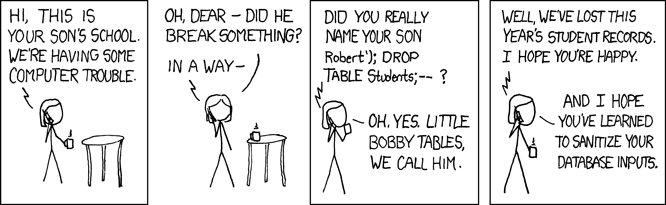
injection (explained in the comic below). Sources: TechCrunch (2009), Help Net Security, on the SQL injection.
- Facebook 2019, and Twitter and GitHub in 2018. Passwords written to internal log files in plain text before the hashing step. Three of the largest engineering organisations on the planet. Sources: Krebs on Security, TechCrunch, BleepingComputer, on Twitter and GitHub.
- Adobe, 2013: 153 million accounts. The passwords were encrypted, not
hashed, which produces identical output for identical input. So every user with the password
- Storing images is a big responsibility.
- Tea, July 2025: 72,000 images including 13,000 selfies and photo IDs. An app for women’s dating safety required a selfie plus a government ID. The images were stored in a cloud storage bucket with no authentication; anyone with the URL could list and download everything. Sources: American Bar Association technical and legal analysis, Engadget.
- Using third party libraries in your web app is a commitment to applying vulnerability patches forever.
- Equifax, 2017: 147.9 million people. An Apache
Struts security patch was published on March 7. An internal notice went out on March 9. A
scan on March 15 failed to find the affected system. Attackers got in in May and
were not noticed until July 29. The fix was only to run
pip install pip-audit && pip-audit. Sources: GAO-18-559 (PDF), House Oversight report (PDF).
- Equifax, 2017: 147.9 million people. An Apache
Struts security patch was published on March 7. An internal notice went out on March 9. A
scan on March 15 failed to find the affected system. Attackers got in in May and
were not noticed until July 29. The fix was only to run
Software and the prompting of
Front end, back end
The basic dichotomies and building blocks, mostly written specifically for people coding with AI.
- Technically: Frontends + Backends: restaurant analogy (dining room = frontend, kitchen =
- Technically glossary: frontend, backend, database, API, server, client
- What’s an API? “like drive-thru windows, but in code.”
- Front end and back end on Wikipedia
- Web apps vs native apps vs hybrid apps (AWS): basic lingo.
Information architecture: how to present information
Look at the world of software around you and how it’s organized. Then you can prompt for those good patterns.
- Mobbin flow: see many, many screens from apps. Be an observer of apps and sites you like, and bring that organization to your own.
- How to Make Sense of Any Mess (Abby Covert): information architecture: “the way we arrange the parts of something to make it understandable.”
Databases
If you need to store data, you probably need a database.
- Software Eng for Vibe Coders: Databases + Storage (Technically): part 2 of the series you already link. “Like a spreadsheet, except with more rules.” Free.
- The Beginner’s Guide to Databases (Technically): baking-ingredients metaphor.
- SQL for the rest of us (Technically): SQL as “say what you want”.
- Technically glossary: relational database, SQL, query, schema.
- Relational database on Wikipedia: super interesting, obvious in retrospect.
- Automate the Boring Stuff, 3rd ed.: SQLite Databases.
git
Software is stored in git because it lets you go backwards and forwards in the change history, with metadata about who changed what, and with the ability to mark certain states with release tags. It also lets people go off on a new branch while others fix bugs on the old branch. It fits the software engineering discipline.
- What’s version control and GitHub? (Technically):
presentation_final_final_2.pptxanalogy. - Glossary: version control, branch, pull request, merging.
- About Git (GitHub docs)
- Hello World (GitHub quickstart): repo, branch, commit, pull request by clicking.
- Learn Git Branching: interactive, commits and branches drawn as a tree.
- Oh Shit, Git!?! (Katie Sylor-Miller): for after your first mistake, shows history is recoverable. Clean-language copy at dangitgit.com.
- git cheat sheet (Julia Evans comic): one page, poster-style.
- Git on Wikipedia
Software engineering

Specs
It remains to be seen if we need to retain this paradigm exactly, but everything here needs to reappear somewhere in the prompt-based development cycle, even if it’s in your head. Learn from your elders!
- Joel Spolsky, Painless Functional Specifications: Part 1, Why Bother?, Part 2, What’s a Spec?: part 2 links a sample spec (WhatTimeIsIt).
- User story (Wikipedia): “As a …, I want …, so that …” template.
- Software requirements specification, Product requirements document (Wikipedia)
- How to Design Programs: the design recipe: problem, signature, examples, body, tests.
Building apps
Coding for devices has its own languages and UI idioms that are designed more centrally by one company, usually. And there are extra steps to build apps for an app store such as Apple’s.
- Apple’s iOS Pathway
- Apple developer Pathway: steps to ship an app
- 100 Days of SwiftUI: I used this.
- Swift Playgrounds: build a real SwiftUI app with live preview on iPad or Mac, no Xcode. The only zero-setup on-ramp for mobile.
- Unwrap: Learn Swift on your iPad
Building web sites
Web sites can be built in many different ways, though there’s usually a mainstream way to do it at any given moment. If you launch something publicly, it needs hosting and databases and security.
- Reddit thread about what to use in 2026
- Next.js on Wikipedia: understanding what this entry is saying about rendering on the server versus in the browser is an excellent goal.
- Reddit thread about building a custom CRM with a floating chat window: I just want to share how people talk about these things.
Building terminal programs
Or you can build a little text-based app, old-school.
AI for coding
You will help write the book on this aspect. For now there are some good early discoveries about how to do this well.
- Not all AI-assisted programming is vibe coding (Simon Willison): rules of thumg: low stakes projects only, watch secrets and data privacy (see above), set billing limits, get a review.
- Learn AI-Assisted Python Programming, 2nd ed.
QA
This is your job now. The agent can build software but you have test it and find bugs and crashes. (That said, there are skills to help the agent test in a real browser or device simulator and find problems on its own.)
- List of famous software bugs (Wikipedia): Ariane 5, Therac-25, Mars Climate Orbiter stories.
- Willison, Here’s how I use LLMs to help me write code: “the one thing you absolutely cannot outsource to the machine is testing.”
- Errors and Exceptions (official tutorial): a traceback example and how to read it.
- Automate the Boring Stuff, 3rd ed.: Debugging: tracebacks, assertions, the debugger.
- How I got better at debugging (Julia Evans comic): “it’s never magic.”
- Debugging (Technically glossary)
- pytest: Get Started: the 4-line first test.
- Software testing, Unit testing, Software bug (Wikipedia).
- Rubber duck debugging (Wikipedia)